
Which pet photos work for a talking pet video?
Updated · Talking Pet App
One sharp photo of one dog or cat, face toward the camera, mouth not covered, close enough that the face is a good part of the picture. Photos of your own pet only (dog, cat, rabbit, bird, hamster and more), one pet per photo. No people in the photo: no selfies, no friends, no children, no public figures.
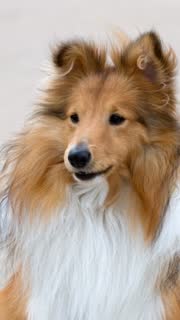
Photos that work
- A sharp photo of one pet, face and mouth clearly visible, looking roughly at the camera, in good light. Side views work but move less.
- Close-ups beat full-body shots: the closer the face, the more the mouth moves.
- Mouth closed or slightly open both work.
What isn't allowed
- Photos of your own pet only (dog, cat, rabbit, bird, hamster and more), one pet per photo.
- No people in the photo: no selfies, no friends, no children, no public figures.
- No nudity, violence or anything in the acceptable use policy.
Other animals?
The site is built and tested for dogs and cats. Other pets with a visible mouth may work but aren't guaranteed; if the video fails, the credits come back automatically.
Two pets in one video?
Not yet: one pet per photo. Make one video for each pet.
Related
- Talking Pet App
- How to make your dog or cat talk from a photo
- How to make your dog sing Happy Birthday
- How to make your cat talk (talking cat video from a photo)
- Is there a free talking pet app?
- Talking pet apps compared
- Can ChatGPT make my dog talk in a video?
- Make your pet talk in your own voice
- Talking pet video not working? Fixes