
Can ChatGPT make my dog talk in a video?
Updated · Talking Pet App
Sort of. When we asked on 2026-11-06, ChatGPT said yes, and given a dog photo it made a short MP4 by writing Python: a dark oval painted over the dog's muzzle that pulses with the syllables, a robotic text-to-speech voice (espeak), and the photo resized to a tall 540×960 frame. The dog's own mouth and jaw don't move. Talking Pet App uses an AI lip-sync video model instead, so your pet's real mouth opens and closes with the voice, for $4.99 a video.
What we asked and what came back
- In a new ChatGPT chat (Plus plan, 2026-11-06) we asked: "Can ChatGPT make a video of my dog talking from a photo?" It answered yes and asked for a photo and the words.
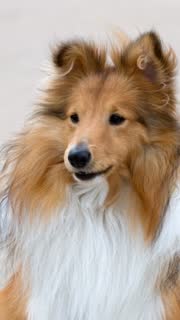
- We uploaded the photo of the Shetland Sheepdog used for our first example video and asked for a short video where he says "Happy birthday, I love you!" out loud, with his mouth moving to the words and the sound included.
- ChatGPT thought for a little over a minute, ran code three times, and replied "Video created" with a download link.
- The code read the words aloud with espeak, a free speech synthesizer with a robotic sound, and stretched the photo to 540×960 pixels.
- For the talking, it drew a soft dark oval (and, on louder syllables, a small pink one for a tongue) just under the dog's nose, growing and shrinking on a timetable it wrote by hand. The dog itself stays still; ChatGPT said it added a gentle zoom.
When ChatGPT is enough
- You want a quick joke to send to a friend and the look doesn't matter.
- You already pay for ChatGPT and want something free right now.
- You're fine with a robot voice and a painted-on mouth.
What Talking Pet App does instead
- An AI video model animates the photo, so your pet's real mouth moves in time with the voice, with small natural head movements.
- Type what your pet says (up to 280 characters) and pick a voice: Playful pup, Big dog, Sassy cat, Sweet and soft.
- Record yourself in the browser, up to 15 seconds.
- Upload an audio or video file: the first 15 seconds are used.
- Pick a song: Happy Birthday.
- An MP4 as long as the voice (up to 15 seconds), 720p, in the same shape as your photo, with the voice you gave it (your recording or audio file, your typed words read aloud, or the song you picked), no watermark.
- One payment of $4.99 for the video, no subscription.
Step by step
- Choose one sharp photo of your dog or cat. A sharp photo of one pet, face and mouth clearly visible, looking roughly at the camera, in good light. Side views work but move less.
- Upload it on the home page (no sign-in needed). Tapping the button confirms the photo is allowed: Photos of your own pet only (dog, cat, rabbit, bird, hamster and more), one pet per photo.
- Give your pet a voice: type the words, record your voice, upload an audio file, or pick Happy Birthday. You can play it back before you go on.
- Pay for just that video ($4.99, one payment, no subscription), or use credits from a pack.
- Wait 2 to 5 minutes. The video shows up in My videos when it's ready.
- Download the MP4 (on iPhone, Save to Photos) and post it, labelled as AI-generated.
Related
- Talking Pet App
- How to make your dog or cat talk from a photo
- How to make your dog sing Happy Birthday
- How to make your cat talk (talking cat video from a photo)
- Is there a free talking pet app?
- Talking pet apps compared
- Make your pet talk in your own voice
- Which pet photos work for a talking pet video?
- Talking pet video not working? Fixes